
Test Manager
Structured test management right within YouTrack: Plan test suites, cases, and steps; run tests—all without switching tools.
 Premium Extension for YouTrack
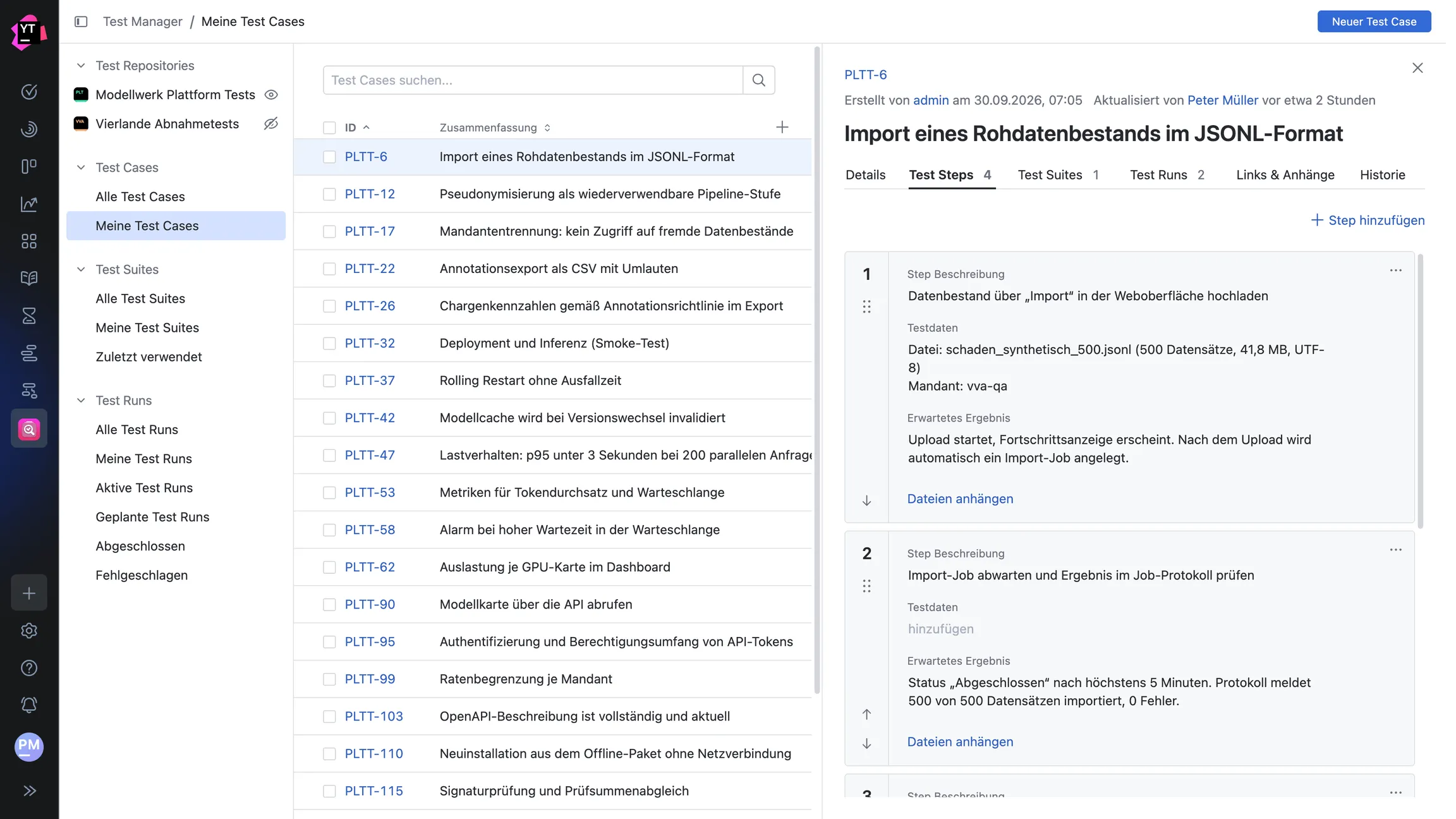
View “My Test Cases” with test steps of a test case
Why Choose " Test Manager " for YouTrack?
Today, project work and quality assurance are often handled using different tools. This results in disjointed workflows, duplicate data entry, and a lack of context. Test Manager this gap and brings structured test management directly into YouTrack.
Test suites, test cases, and test steps are represented as native YouTrack issues and take full advantage of everything YouTrack has to offer: custom fields, the roles and visibility model, comments, links, and search.
Test Management
The app integrates into YouTrack as a separate section. Using a sidebar with tables and filters, you can view your test suites and navigate to the details of individual test cases and steps. New test steps are created directly in context, sorted via drag-and-drop, and saved automatically. Attachments can also be added via drag-and-drop.
You capture descriptions, preconditions, and expected results in a Markdown editor that functions identically in all areas of the app: when creating test cases and test suites, in the Details tab, on the test case cards of a test suite, and during the execution of a test step.
The app also remembers how you work. The width of the detail pane, shown and hidden projects, and your project selection are retained across sessions. At the same time, the URL remains the same, so you can still easily share a view with colleagues via a link.
Test Execution
You can create as many test runs as you like from your test suites and execute them in an organized manner: start, pause, resume, and complete. Each test step transparently passes its status on to the dependent steps.
The "My Test Runs" view consolidates everything assigned to you, while a comprehensive change history tracks who tested which step and when. Status transitions can be automated using YouTrack workflows, so you can track the progress of a test run at any time.
configuration
You define which YouTrack projects serve as test repositories in the app's configuration. The overview is searchable and filterable, sorted alphabetically, and prioritizes repositories with configuration errors. This ensures you maintain an overview even in large instances with many projects.
Would you like to continue using this app? License now.
Questions & Feedback
Do you have questions about Test Manager or suggestions for future improvements? We look forward to hearing from you.
Contact usThe most important advantages
Seamlessly integrated with YouTrack
Work in your familiar YouTrack interface, without having to switch tools or maintain data in two places.
Clear hierarchy
Test suites, test cases, and test steps are consistently structured and searchable in YouTrack.
Conduct Test Runs
Start, pause, and complete test runs; assign a status to each test step; and track progress.
Well-designed UI & UX
Layout and interaction are based on JetBrains' Ring UI. Version 1.1 alone includes over 50 improvements to tables, scrolling behavior, loading indicators, and the editor.
If you have been using Jira and Zephyr
Planning and implementation services are fully available. And even more importantly: We support you with specialized migration scripts that securely and completely transfer your existing test structures and history to YouTrack. For detailed information, please feel free to contact us directly!
What's Already Possible Today and What's Next
Test Manager Roadmap
Test Manager Version 1.0 has covered the entire test management cycle. Version 1.1 has primarily made daily work more convenient, and development continues at short intervals.
Already available
- Planning in Test Suites, Test Cases, and Test Steps
- Running Test Runs: Start, Pause, Finish
- Status for each test step, including propagation to dependent steps
- "My Test Runs" view and complete change history
- Status Automation via YouTrack Workflows
- Identify blocked test cases and test steps
- Search, filter, and manage test repositories in a sorted manner
- Saved view settings and project selection per user
- Unified Markdown editor across all areas of the app
- Freely select and arrange visible table columns
Planned for future versions
- Automatic ticket creation for failed steps
- Clone and move test cases and test suites
- Custom Saved Searches and YouTrack Tags
- Insert images directly into the Markdown editor
- REST API for Generating Test Data
- Reports on Test Coverage and Versioning
- Advanced Migration from Zephyr and X-Ray
- Test automation and integration into CI/CD pipelines
Your real-world feedback helps us prioritize our roadmap. Please let us know what you'd like to see.
Frequently asked questions
Here you'll find answers to the most important questions about twenty20 Test Manager twenty20 Test Manager JetBrains YouTrack.
Test Manager is a YouTrack extension that allows you to map the entire test management cycle directly within YouTrack. You plan test suites, test cases, and test steps as native YouTrack issues and execute them in test runs—all without switching tools.
Installation is done exclusively through the JetBrains Marketplace. On the app page in the Marketplace, enter the base URL of your YouTrack instance and click 'Install'. You can then manage the app in your YouTrack instance under Administration → Apps.
Test Manager The hierarchy is as follows: Test Suite, Test Case, and Test Step. All objects are actual YouTrack issues and can be accessed both through the app interface and via the classic YouTrack issues view.
Version 1.1 is a release focused on user experience and refinement. The test repository configuration is now searchable and filterable, alphabetically sorted, and incorrectly configured repositories are prioritized. Your personal view settings, such as the width of the details pane, shown and hidden projects, and project selection, are retained across sessions. Additionally, the Markdown editor is now based on our shared component library, ensuring consistent behavior throughout the app.
Over 50 improvements have been incorporated into the user interface, including changes to tables and column widths, pagination, scrolling behavior, loading indicators, and the detailed view.
Yes. One or more source projects can be stored as test repositories for each work context. This allows test cases from different projects to be managed together.
The configuration helps you maintain an overview even with many projects: The list of test repositories is sorted alphabetically, can be searched and filtered, and repositories with configuration errors appear at the beginning of the list.
A Markdown editor is available for all text content: when creating a test case or test suite, in the details tab, on the test case cards within a test suite, and during the execution of a test step.
Since version 1.1, it uses Test Manager It uses the same editor as our other YouTrack apps. This ensures consistent behavior across the entire app and allows for centralized development.
App visibility can be controlled on a per-user-group basis. This allows you to specify exactly which internal or external users Test Manager access to Test Manager .
When designing the user interface, we place particular emphasis on seamless integration with YouTrack. The layout, interaction patterns, and design language are consistently aligned with JetBrains Ring UI, ensuring that Test Manager feels Test Manager a natural part of your YouTrack instance. With every release, you can see that significant development time has been invested in fine-tuning and enhancing the user experience.
You can try Test Manager for free for 30 days via the JetBrains Marketplace. To activate the trial, you only need to provide the base URL of your YouTrack instance and your contact information.
Once the trial expires, you’ll need to purchase a license. This gives you plenty of time to decide whether Test Manager is the right tool for your needs.
Due to a specific customer request, we have so far focused our scripts on migration from Zephyr. However, our goal is, of course, Test Manager enable X-Ray users to migrate to YouTrack and Test Manager as well.
Are you using X-Ray and would like to migrate to YouTrack? Please feel free to contact us directly, and we will work with you to develop a migration plan.

twenty20 GmbH & Co. KG
Hausinger Straße 6
40764 Langenfeld
+49 (0) 2173 167 00 50