Fieldwise
Configurable field displays in the YouTrack issue panel with flexible layouts organized as groups or tab groups.
Free YouTrack Extension
Why Fieldwise for YouTrack?
The app solves a specific everyday problem in YouTrack: the more fields a project has, the more cluttered it becomes. Fieldwise integrates directly into the YouTrack issue panel and enhances it with configurable field displays featuring flexible layouts organized as groups or tab groups.
A modular editor
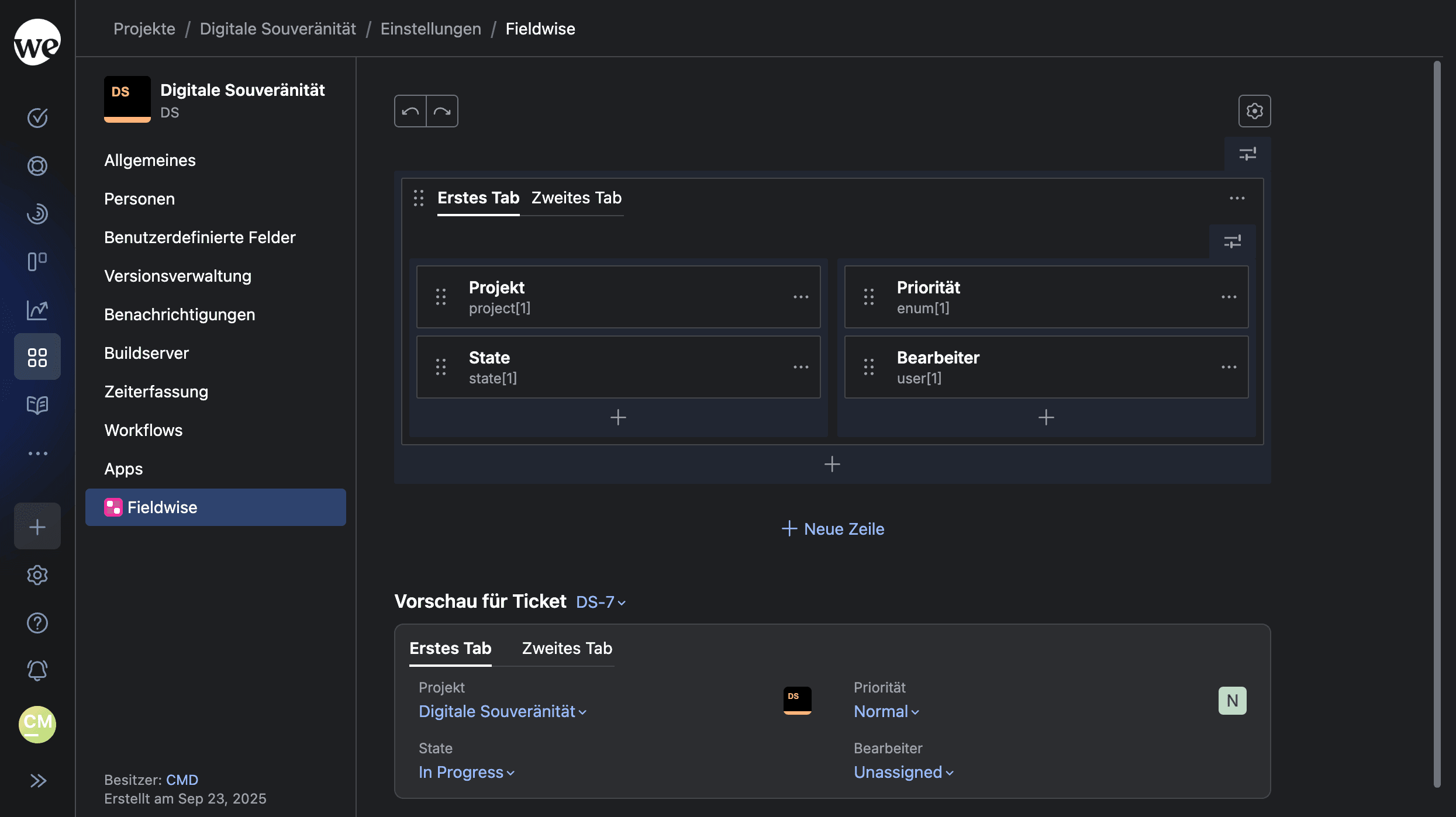
Configure your field layout using drag-and-drop and move all elements freely to the desired position. Groups can be renamed, expanded or collapsed, and optionally displayed as a separate map. Multiple groups can be bundled into a tab group to save space. The live preview immediately shows how everything will look later in the issue panel.
Project-Level Configuration
Admins can configure Fieldwise in the respective project settings. The field layout applies centrally to the entire project, and all user-defined fields are available in the editor. By default, all users of your instance see the configured field layout. If necessary, you can restrict the app to specific user groups and enable or disable it on a per-project basis.
Install for free
via JetBrains Marketplace
Installation is done exclusively through the JetBrains Marketplace. There, enter the base URL of your YouTrack instance and select “Install.”
Questions & Feedback
Do you have questions about Fieldwise or suggestions for future improvements? We look forward to hearing from you.
Contact usFrequently asked questions
Here you'll find answers to the most important questions about the Fieldwise extension for JetBrains YouTrack from twenty20 .
Fieldwise is an extension for JetBrains YouTrack that enables configurable field displays in the issue panel. Using a drag-and-drop editor, you can organize fields into thematic groups and tab groups. Fieldwise is an add-on and does not replace YouTrack's native behavior.
The Fieldwise Editor is the heart of the app. All objects can be freely moved using drag-and-drop; groups and tab groups can be renamed, expanded or collapsed, or displayed as a map. A live preview immediately shows how the fields will appear in the issue panel.
YouTrack displays custom fields natively without grouping them by theme. Fieldwise adds this exact level of structure directly to the issue panel without replacing the native behavior.
Yes. Fieldwise offers the same editing and field functions as the native YouTrack field panel, so the editing experience remains the same.
Administrators configure the settings in the respective project settings. There, the field layout in the editor is defined centrally for the entire project. End users do not need any special permissions and automatically benefit from the configured structure.
By default, Fieldwise is visible to all users of your instance. If necessary, you can restrict access to the app to specific user groups. You can also enable or disable Fieldwise on a per-project basis.
Fieldwise is currently a free app. Premium features are planned for future versions, including the ability to roll out different configurations specifically to individual users or user groups—for example, so that developers primarily see technical fields and project managers primarily see planning fields.
Installation is done exclusively through the JetBrains Marketplace. On the app page in the Marketplace, enter the base URL of your YouTrack instance and select "Install." You will then find Fieldwise in your instance under Administration → Apps, where you can manage the app and enable it for individual projects.

twenty20 GmbH & Co. KG
Hausinger Straße 6
40764 Langenfeld
+49 (0) 2173 167 00 50